
Accounts payable (AP) is the money a business owes to suppliers, vendors, and service providers for goods or services it has received but not yet paid for. It's recorded as a current liability on the balance sheet.
For example, if a company receives $10,000 of inventory on Net 30 terms, that $10,000 unpaid invoice is accounts payable until the company pays it. In simple terms, AP tracks money going out of the business. The AP process covers receiving invoices, checking them, getting approval, paying the vendor, and recording the transaction.
| Term | What it means |
|---|---|
| AP | Accounts payable, money the business owes vendors |
| Vendor | A business that supplies goods or services |
| Invoice | The vendor's request for payment |
| PO | Purchase order, the buyer's official order to a vendor |
| Net 30 | Payment terms: the invoice is due 30 days after the invoice date |
| Three-way match | Comparing the PO, receiving record, and invoice before paying |
| DPO | Days payable outstanding, the average days a business takes to pay vendors |
| AP aging | A report grouping unpaid invoices by how long they've been outstanding |
Accounts Payable Definition
Accounts payable is the total amount a business owes to outside vendors for goods or services it has already received, when payment hasn't been made yet. It's a short-term obligation, so it appears as a current liability on the balance sheet.
AP is created whenever a business buys on credit instead of paying right away. That includes inventory, raw materials, equipment, software, and services. The obligation can be recurring, like a monthly software bill, or one-time, like a single equipment purchase.
AP isn't a list of every dollar a business owes. Loans, payroll, and most taxes are tracked in separate accounts. Accounts payable mainly covers unpaid vendor and supplier invoices. And it's the opposite of accounts receivable, which is money customers owe you.
An Accounts Payable Example
A manufacturer buys $25,000 of raw materials from a supplier on Net 30 terms. Here's how accounts payable changes from start to finish:
Is Accounts Payable an Asset or a Liability?
Accounts payable is a liability, not an asset. Assets are things a business owns or is owed, like cash, inventory, and accounts receivable. Liabilities are things a business owes to others, like loans and accounts payable.
AP is generally a current liability because supplier invoices are normally paid within the company's short-term operating cycle, usually well within a year. Common terms are Net 30 or Net 60, but terms vary by agreement.
| Account type | Financial statement | Normal balance | Increases with | Decreases with |
|---|---|---|---|---|
| Current liability | Balance sheet | Credit | Credit (new invoice) | Debit (payment or credit memo) |
What Businesses Record as Accounts Payable
Accounts payable generally covers amounts owed to suppliers and other vendors for goods or services received but not yet paid. Common examples include:
- Supplier invoices for raw materials, parts, or finished goods
- Inventory bought on credit terms
- Software subscriptions billed by invoice
- Professional services, such as legal, consulting, or accounting fees
- Utilities billed after use, like electricity, water, and internet
- Office supplies, equipment rentals, repairs, and maintenance
- Freight and shipping charges from carriers
What Is Not Included in Accounts Payable?
| Usually recorded separately | Why |
|---|---|
| Payroll liabilities | Wages owed to employees are tracked in payroll-related accounts |
| Taxes payable | Income, sales, and payroll taxes are separate liability accounts |
| Loans and notes payable | These are financing obligations, not ordinary vendor invoices |
| Accrued expenses | The cost has been incurred, but no invoice has been received yet |
Why Accounts Payable Matters
Accounts payable affects cash, vendor relationships, and the accuracy of your books. Managed well, it helps a business:
- Plan cash: know what's due and when, so money is available
- Pay vendors on time: avoid late fees and keep good terms with suppliers
- Prevent mistakes: catch duplicate invoices and wrong amounts before paying
- Keep accurate books: record every liability in the right period
- Manage working capital: use supplier credit terms instead of paying cash upfront
Accounts Payable vs Trade Payables
The two terms are often used interchangeably. When they're separated, trade payables usually means amounts owed to suppliers for goods or inventory bought on credit, while accounts payable is used more broadly for all unpaid vendor invoices, including services, utilities, and subscriptions. Terminology varies by company and accounting system.
Accounts Payable vs Accrued Expenses
Both are current liabilities, but the difference is the invoice.
| Accounts payable | Accrued expense | |
|---|---|---|
| Invoice received? | Yes | Not yet |
| Amount | Exact amount from the invoice | Often an estimate |
| Example | A supplier invoice for March materials | March electricity used, bill arrives in April |
| What happens next | Paid when due | Reversed or replaced by AP when the invoice arrives |
For a full breakdown with journal entries, see our guide to accrued expenses vs accounts payable.
How Does the Accounts Payable Process Work?
Most businesses follow these seven steps, from deciding to buy something to paying for it:
- Purchase requestAn employee or department asks to buy goods or services.
- Purchase orderOnce approved, the company sends the vendor a PO with the quantity, price, and terms.
- Receive goods or servicesThe business confirms what actually arrived matches the order.
- Receive the invoiceThe vendor sends an invoice asking for payment.
- Verify and matchAP checks the invoice against the PO and receiving record and codes it to the right account.
- ApproveAn authorized person signs off on the invoice for payment.
- Pay and reconcileThe vendor is paid by ACH, check, card, or wire, and the payment is matched to the books and bank records.
Skipping verification or approval increases the risk of payment errors, overpayments, and unauthorized payments. For a detailed walkthrough of each step, read our accounts payable process guide. To learn how payments are checked against vendor statements and the general ledger afterward, see accounts payable reconciliation.
What Is Three-Way Matching?
Three-way matching compares three documents before an invoice is paid:
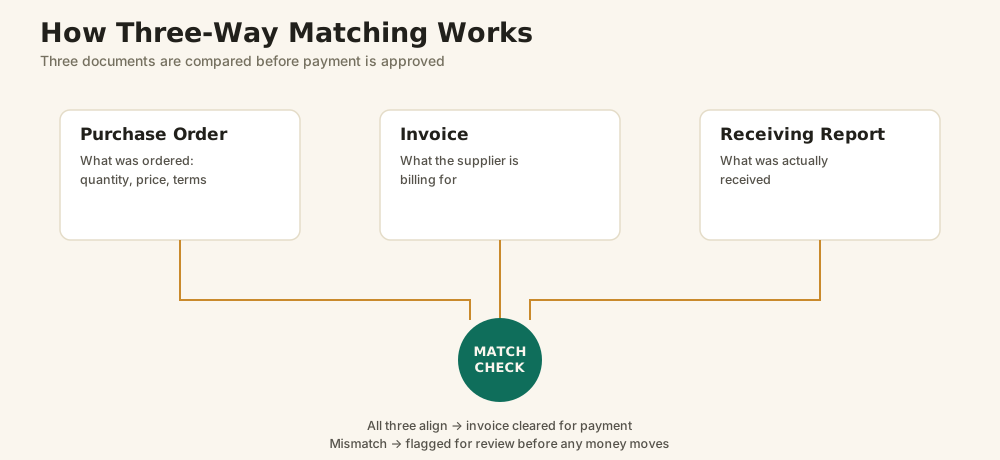
- Purchase order: what you ordered
- Receiving report: what you actually received
- Invoice: what the vendor is billing
If they agree, the invoice moves on to approval. If they don't, for example the invoice bills 100 units but only 90 arrived, it's held until the difference is resolved. Three-way matching helps catch billing errors and reduces certain payment risks, but it's only one part of a good set of AP controls. Purchases without a PO, like utilities, are usually checked differently.
How Is Accounts Payable Recorded?
Example 1: Buying inventory on credit
A business buys $5,000 of inventory from a supplier on credit.
| Account | Debit | Credit |
|---|---|---|
| Inventory | $5,000 | |
| Accounts Payable | $5,000 |
Inventory (an asset) goes up, and accounts payable (a liability) goes up because the business now owes the supplier.
Example 2: Paying the invoice
| Account | Debit | Credit |
|---|---|---|
| Accounts Payable | $5,000 | |
| Cash | $5,000 |
The liability is settled, so accounts payable goes down, and cash goes down because money left the business.
Example 3: Buying a service on credit
A company receives a $1,200 invoice for IT support it used this month.
| Account | Debit | Credit |
|---|---|---|
| IT Services Expense | $1,200 | |
| Accounts Payable | $1,200 |
Here the debit goes to an expense account instead of inventory, because the service was used up right away.
Is Accounts Payable an Expense?
No. Accounts payable is a liability, not an expense. The expense records the cost the business incurred. Accounts payable records the amount still owed for that cost. Example 3 above shows both: the $1,200 IT expense and the $1,200 owed.
Paying the invoice doesn't create a new expense. It just settles the liability.
Where Does Accounts Payable Appear on Financial Statements?
| Financial statement | How AP appears |
|---|---|
| Balance sheet | As a current liability, showing the total owed to vendors on a specific date |
| Cash flow statement | Changes in AP affect operating cash flow under the indirect method. An increase in AP adds to cash flow, because costs were incurred but not yet paid. A decrease subtracts. |
| Income statement | AP itself doesn't appear. The related expense or cost of goods sold is recognized there instead. |
Understanding AP Aging
An AP aging report groups unpaid invoices by how long they've been outstanding, usually in buckets like Current, 1 to 30 days, 31 to 60 days, 61 to 90 days, and over 90 days past due. It shows what needs to be paid soon and which invoices may be stuck. Our accounts payable aging report guide includes a worked example, formulas, and how to read one.
Accounts Payable vs Accounts Receivable
| Accounts payable | Accounts receivable | |
|---|---|---|
| Meaning | Money the business owes vendors | Money customers owe the business |
| Account type | Current liability | Current asset |
| Normal balance | Credit | Debit |
| Cash flow | Future cash out | Future cash in |
| Key metric | Days payable outstanding (DPO) | Days sales outstanding (DSO) |
For a deeper comparison, see accounts payable vs accounts receivable.
Common Accounts Payable Challenges
These problems tend to grow as invoice volume grows:
- Manual data entry: retyping invoices is slow and leads to typos
- Slow approvals: invoices wait in inboxes and miss due dates
- Duplicate invoices: the same bill arrives by email and mail and gets paid twice
- Lost invoices: paper and email invoices get buried, so liabilities go unrecorded
- Payment errors: wrong amounts, vendors, or bank details
- Weak controls: loose approval and vendor-change processes make fake invoices and redirected payments easier
What Is Accounts Payable Automation?
Accounts payable automation uses software to handle repetitive AP tasks. Common capabilities include reading invoices with OCR, flagging duplicates, matching invoices to POs, routing them to approvers, tracking status, and keeping a timestamped audit trail. People still review exceptions and make approval decisions.
Automation becomes useful when invoice volume grows, approvals involve several people, or the team spends much of its time entering data and chasing sign-offs. Learn more about the benefits of AP automation, including when it's worth the investment.
Common Accounts Payable Metrics
| Metric | What it tells you |
|---|---|
| Days payable outstanding (DPO) | How long, on average, you take to pay vendors |
| Invoice processing time | Days from receiving an invoice to having it ready for payment |
| On-time payment rate | Share of invoices paid by the due date |
| Exception rate | Share of invoices that need manual correction or review |
| Duplicate payment rate | How often the same invoice is paid twice |
See our full list of accounts payable metrics with formulas.
Exploring AP Automation?
If your team manages invoices through email, spreadsheets, or disconnected systems, AP automation can bring capture, approvals, payment status, and reporting into one place. Quick Payable does this inside Salesforce for companies that already run their business there. If you're comparing options, our guide to Salesforce AP automation software lays them out side by side.
Frequently Asked Questions
AP stands for accounts payable, the money a business owes to suppliers and vendors for goods or services it has received but not yet paid for. AP can also refer to the team or department that manages those payments.
A company receives $25,000 of raw materials with an invoice due in 30 days. Until it pays, the $25,000 is recorded as accounts payable. When it pays on day 30, accounts payable drops to zero and cash drops by $25,000.
Yes. Accounts payable is generally a current liability because supplier invoices are normally paid within the short-term operating cycle, usually well within a year. It appears in the current liabilities section of the balance sheet.
Accounts payable has a normal credit balance. It increases with a credit when a new invoice is recorded and decreases with a debit when the invoice is paid or a credit memo is applied.
No. Accounts payable is a liability. The expense records the cost incurred, while accounts payable records the amount still owed for it. Paying the invoice reduces the liability and cash but does not create a new expense.
Accounts payable is recorded when a vendor invoice has been received, for an exact amount. An accrued expense is a cost incurred before an invoice arrives, often recorded as an estimate. Both are current liabilities.
Accounts payable is money a business owes vendors, recorded as a liability. Accounts receivable is money customers owe the business, recorded as an asset. AP represents future cash out, and AR represents future cash in.
Three-way matching compares the purchase order, the receiving report, and the vendor invoice before payment. If quantities, prices, and terms agree, the invoice moves to approval. If not, it is held until the difference is resolved.
It is the set of steps a business follows to manage what it owes: purchase request, purchase order, receiving goods or services, receiving the invoice, verifying and matching it, approving it, and paying and reconciling.
AP automation is software that handles repetitive accounts payable tasks such as invoice capture, data extraction, duplicate checks, matching, approval routing, and status tracking. People still review exceptions and make approval decisions.

Dadhich Rami is a technology professional with 10+ years of experience in Salesforce solutions, AppExchange applications, and third-party integrations. He writes for Quick Payable about accounts payable, AP automation, and Salesforce, with a focus on practical solutions that improve business workflows and efficiency.