

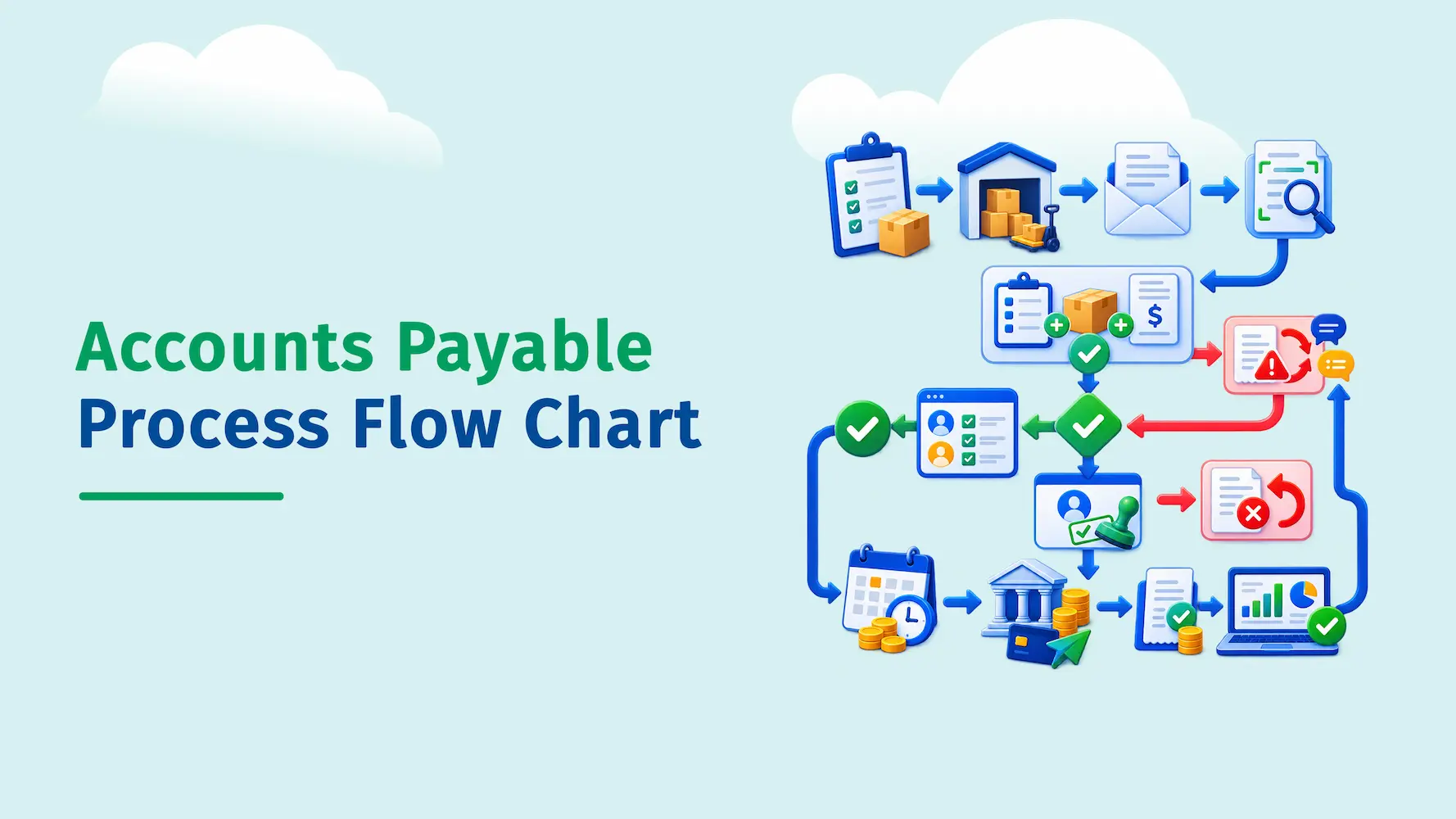
An accounts payable process flow chart shows each step an invoice follows, from purchase order creation to vendor payment and final reconciliation. It typically includes invoice receipt, data capture, three-way matching, approval, payment, and reconciliation, along with decision points for handling exceptions and mismatches.
What Is an Accounts Payable Process Flow Chart?
An accounts payable process flow chart is a diagram that lays out, step by step, how a business handles the money it owes to suppliers and vendors. It turns a process that usually lives in someone's head, or scattered across email threads and spreadsheets, into a picture anyone on the team can follow.
You might also see this called an account payable process flow chart, an AP workflow diagram, or a full-cycle accounts payable flow. They all describe the same thing: a visual record of how an invoice travels from "received" to "paid."
Each box in the chart usually represents one action, like capturing an invoice or routing it for approval. Arrows show the direction the invoice moves in, and diamond shapes mark decision points, such as whether an invoice matches its purchase order.
Why Businesses Use an AP Process Flow Chart
Finance teams don't build these charts just to have a nice picture on the wall. A clear flow chart solves a handful of real, everyday problems.
- It gives new AP staff a fast way to learn the process instead of shadowing a coworker for weeks
- It makes it easy to spot where invoices tend to get stuck or delayed
- It documents internal controls, which auditors and lenders often ask to see
- It creates a shared reference point when departments disagree about "who does what"
- It highlights manual steps that are good candidates for automation
If your team has ever asked "wait, who's supposed to approve this?" mid-invoice, that's usually a sign the process isn't written down anywhere. A flow chart fixes that.
Standard Flowchart Symbols Used in AP Diagrams
You don't need specialized training to read or build one of these charts. Most accounts payable flow charts use the same handful of standard flowchart shapes:
| Shape | What It Represents | Example in an AP Chart |
|---|---|---|
| Oval (terminator) | Start or end of the process | "Purchase order created" or "Invoice closed and reconciled" |
| Rectangle | A process or action step | "Invoice data captured and coded" |
| Diamond | A decision point with two or more outcomes | "Do the amounts match?" |
| Arrow | Direction of flow between steps | Connects each step to the next |
| Parallelogram | Input or output of data or documents | "Vendor invoice received" |
Keeping to these standard shapes matters more than it might seem. Anyone in finance, from a new hire to an external auditor, can pick up a properly built flow chart and understand it without a legend.
The Accounts Payable Process Flow Chart: Step by Step
Here's what a complete accounts payable process flow chart looks like in practice, covering the path an invoice takes from purchase order through payment and reconciliation, including the two most common decision points.
The full accounts payable process flow chart, from purchase order to reconciliation, with exception-handling loops for mismatches and rejected invoices.
Now let's walk through what's actually happening at each stage.
1. Purchase Order Created
For most non-recurring purchases, the process starts before the invoice even arrives. Someone requests goods or services, and the company issues a purchase order (PO) that spells out what's being bought, the agreed price, and the quantity.
2. Goods or Services Received
When the order shows up, whoever receives it (a warehouse team, an office manager, a project lead) confirms what actually arrived and logs it, often as a receiving report or goods received note (GRN).
3. Vendor Invoice Received
The vendor sends an invoice for the amount owed. It might land in an inbox, a vendor portal, the mail, or get captured automatically through AI-powered invoice capture.
4. Invoice Data Captured & Coded
Someone (or some system) pulls the key details off the invoice: vendor name, invoice number, amount, due date, and line items, then assigns the correct general ledger code so it lands in the right expense category.
5. Three-Way Match
Three-way matching is an important control for checking that the invoice, purchase order, and receiving records agree before payment.
6. Approval Routing
Once the invoice checks out, it's routed to the right approver, usually based on the department, the vendor, or the dollar amount. Larger invoices often need sign-off from more than one person.
7. Payment Scheduling & Execution
Approved invoices get scheduled for payment according to the vendor's terms (net 30, net 60, and so on), then paid by ACH, check, wire, or card.
8. Reconciliation & Record Keeping
The paid invoice gets marked as closed, matched against the payment in the accounting system, and filed with an audit trail showing who approved what and when.
The Three-Way Match, Explained
The three-way match deserves its own closer look, since it's the step where most invoice exceptions get caught before money goes out the door.
A three-way match compares the purchase order, receiving report, and vendor invoice before an invoice can move forward.
Some companies use a simpler two-way match (PO vs. invoice only), which works fine for services or smaller purchases where a separate receiving step doesn't make much sense. Higher-risk or higher-value purchases usually call for the full three-way match.
When something doesn't line up, that invoice gets kicked into an exception queue instead of moving forward. This is exactly the branch shown as the "No" path in the flow chart above.
Manual vs Automated AP Process Flow Chart
The steps themselves don't change much between a manual and an automated process. What changes is who, or what, is doing the work at each stage, and how long it takes to move from one box to the next.
The same accounts payable process, shown as a manual flow and an automated flow.
Neither version skips a step. A three-way match still happens either way, and an invoice still needs approval either way. The difference is that automation replaces manual, error-prone handoffs with rules-based routing and system checks, which is why processing time and error rates tend to drop once a company moves off spreadsheets and email approvals.
Common Bottlenecks an AP Flow Chart Can Reveal
Once you actually map your process out, certain problems tend to jump off the page. Watch for these when you build or review your own chart.
- Invoices sitting in a shared inbox with no owner or deadline attached
- Approvals stuck with one person who's traveling, out sick, or simply slow to respond
- No purchase order on file, which forces a manual, back-and-forth verification instead of a quick match
- Duplicate invoices that slip through because no one is checking invoice numbers against past payments
- Unclear approval limits, where it's not obvious who can approve what dollar amount
- No audit trail, making it hard to answer "who approved this, and when?" months later
If your flow chart has a box with three or four arrows pointing into it and only one arrow out, that's usually where invoices pile up.
Best Practices for Building Your Own AP Process Flow Chart
Building an accurate flow chart takes a bit more than sketching boxes and arrows. A few habits make the difference between a chart people actually use and one that gets ignored after a week.
- Map what actually happens today, not what your policy manual says should happen. The gap between the two is often where problems live.
- Talk to the people doing the work. AP clerks, approvers, and vendors often know about workarounds that never made it into any documentation.
- Include decision points, not just steps. A chart without diamonds for "approved?" or "match confirmed?" leaves out the moments that actually determine what happens next.
- Label who owns each step. A role or job title next to each box removes ambiguity fast.
- Show exception paths, not just the happy path. Most of the real value in a flow chart comes from mapping what happens when something goes wrong.
- Review it at least once a year, or any time you change accounting systems, add approval tiers, or bring on new vendors.
Common Mistakes to Avoid
A few mistakes are common when teams first document their AP process.
- Making it too detailed. Too many boxes can make a flow chart difficult to follow. Keep each box focused on one clear action.
- Skipping exception paths. A flow chart should show what happens when an invoice has an issue, not just the normal process.
- Confusing accounts payable with accounts receivable. These processes handle different sides of a transaction.
- Never updating it. An outdated flow chart can quickly become misleading. Review it whenever your systems or processes change.
- Leaving out finance leadership. Approval limits and control requirements should match your company's finance policies.
How Automation Changes the Accounts Payable Process Flow
Automation does not remove the main stages of the Accounts payable process. It makes each stage faster, more consistent, and easier to track.
With AP automation software, invoices can be captured with AI OCR, matched automatically with purchase orders and receiving records, and routed for approval based on predefined rules. Every action is recorded, making audits and reconciliation easier.
As invoice volume grows, automation helps reduce manual work, processing delays, duplicate payments, and missed early-payment discounts. An accounts payable aging report can also help teams track overdue invoices and outstanding balances.
Quick Payable supports this workflow with automated invoice capture, AI data extraction, matching, approval routing, and invoice status tracking from receipt to payment.
Conclusion
An accounts payable process flow chart is really just a map of a promise: the promise a business makes to pay what it owes, accurately and on time. Whether you draw it as a simple five-step diagram or a detailed chart with every exception path included, the goal stays the same, giving your team a clear, shared picture of how an invoice moves from purchase order to payment.
Start by mapping what your process actually looks like today, add the decision points and exception paths, and revisit the chart whenever your systems or approval rules change. From there, automation can take over the repetitive parts of the flow, letting your team focus on the exceptions that genuinely need a human eye.
Frequently Asked Questions
The main steps are receiving the invoice, checking and matching it, getting approval, scheduling the payment, making the payment, and recording the transaction.
A three-way match compares the purchase order, receiving report, and vendor invoice. It checks that the items, quantities, and prices match before the invoice is approved for payment.
Start by listing each step in your AP process, from purchase order to payment. Then add the people responsible, approval steps, matching checks, and exception paths. Use standard flowchart shapes to show processes and decisions clearly.
An AP process flow covers the full process from purchase order to payment and reconciliation. An invoice approval workflow covers only the approval stage within that process.
Yes. AP automation can handle tasks such as invoice capture, data entry, three-way matching, approval routing, and payment scheduling. This helps reduce manual work and speed up invoice processing.